
Practical image workflow
Remove Background from Line Drawing
Background removal behaves differently around open and closed contours. Use these reproducible examples to decide where automatic removal works and where a manual mask is needed.
Open background removerReproduce the examples
Download each source and compare your result with the actual tool output. The colored display surface is behind the PNG; it is not added to the downloadable file.
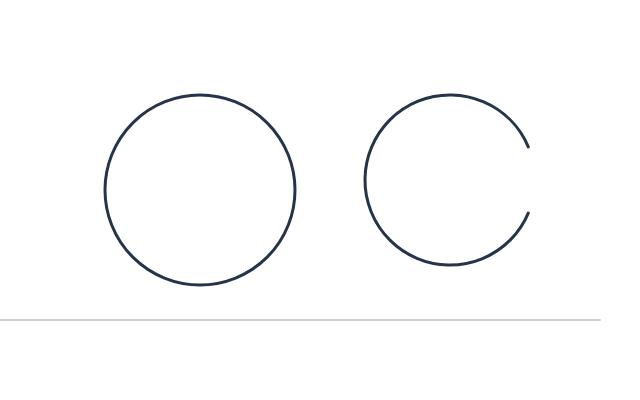
Original synthetic diagnostic
640 × 400; fictional test artwork, not a real scan.
Download Original synthetic diagnostic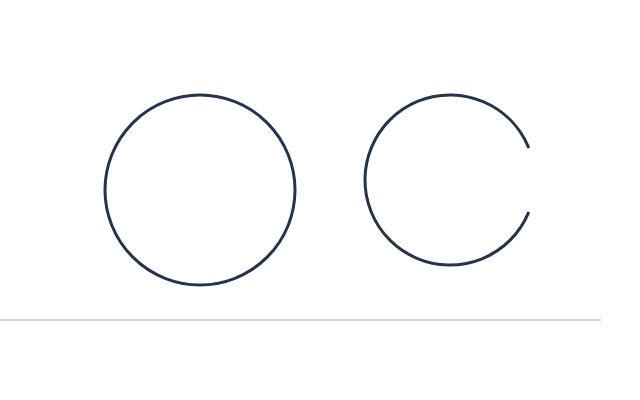
Tolerance 20, feather 0
Actual PNG downloaded from the background remover.
Download Tolerance 20, feather 0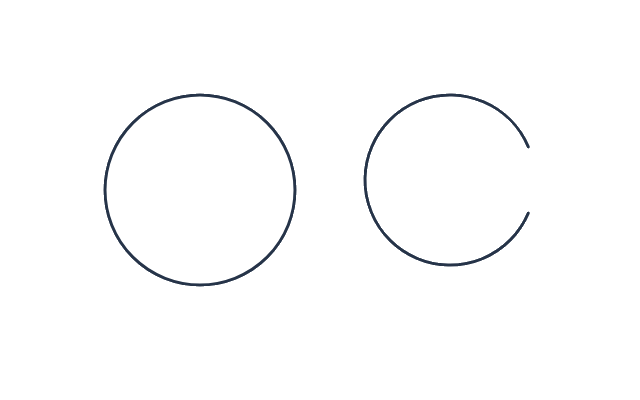
Tolerance 90, feather 0
Same source; inspect pale strokes and enclosed regions.
Download Tolerance 90, feather 01. Decide which white areas should disappear
A line drawing can contain both paper background and deliberately white shapes. Before removing anything, identify the spaces that must become transparent. Our original 640 × 400 Canvas diagnostic contains a closed circle, an open curve and a pale line reaching the image edge. It is a synthetic test drawing, not a customer illustration. The open and closed shapes let you see whether the tool treats connected and enclosed paper differently.
2. Give the remover clean corner samples
Use a flat, evenly lit scan or an exported PNG, with paper visible at all four corners. The remover averages small corner samples and then follows similar pixels inward from the boundary. A border or dark artwork in a corner can change the sampled palette. Crop scanner borders before uploading, but do not cut away real strokes simply to make removal easier. Keep the untouched source as a reference.
3. Clear the outside paper at low tolerance
Load the source and set tolerance 20, feather 0. Run the remover and download PNG. Compare the open curve and closed circle on the colored display surface below. The outside background can become transparent, and the opening in the curve lets removal reach its interior. A closed dark outline blocks that path. This is connectivity-based removal, not semantic understanding of a drawing.
4. Inspect the closed circle before increasing tolerance
In this diagnostic the closed circle’s center remains opaque after removal, including at tolerance 90. That is expected behavior, not proof that the PNG lacks transparency elsewhere. If all paper inside enclosed shapes must disappear, select those regions in a manual editor or use a workflow designed to extract line art. Do not keep increasing tolerance until the outline itself is erased just to reach the center.
5. Test faint lines as a separate failure case
Rerun the untouched source at tolerance 90 and feather 0. The pale horizontal line is connected to the boundary and close to paper color, so the more permissive threshold can erase it. Compare its far end and continuity against the tolerance-20 output. A larger clear area is not a quality score. Use the lowest setting that removes the required background while retaining every stroke that matters.
6. Add feather only after the mask is acceptable
The examples keep feather at zero to isolate tolerance. In this tool feather extends the color-distance range and makes some accepted pixels partially transparent; it is not a spatial blur radius. Adding feather can soften a fringe, but it cannot restore a deleted line or distinguish white fill from paper. Inspect a test export on both dark and white surfaces before adding smoothing to the final artwork.
7. Keep alpha through the final placement
Export PNG, reopen it in the transparent PNG checker, and inspect the open region, closed center and pale stroke separately. A document editor may show the image on white even when the outer region is transparent. Test it on the actual destination color. If the drawing needs exact flat fills or editable strokes, keep the original vector or layered source rather than treating a raster cutout as a replacement.
Questions before exporting
Why does white remain inside closed shapes?
Only background-colored pixels connected to the outer image boundary are visited. A closed dark contour prevents that connection.
Can I remove paper without losing pencil lines?
It depends on color separation. Faint lines near the paper color can disappear at higher tolerance; rescan with better contrast or use manual masking when needed.
Is this an AI line-art extractor?
No. It is a local corner-color and boundary-connectivity remover. It does not identify intended strokes or reconstruct erased details.